OAuth Code Interception Through Intent Hijacking
Introduction
While analyzing an Android application, I came across an authorization code interception vulnerability due to insecure deep link handling and a missing PKCE implementation. This blog explores how OAuth is implemented in Android applications, how a missing PKCE implementation combined with insecure deep link handling can allow an attacker to intercept authorization codes and gain full account access, and how PKCE protects against this attack.
Normal OAuth 2.0 flow
OAuth 2.0 is an authorization framework that lets a third-party application access a user’s resources on another service without the user sharing their credentials.
A normal oauth flow is:
- User taps “Login with Google / Facebook”
- App redirects user to the Authorization Server
- User logs in and grants permission
- Auth server returns an authorization code to the app
- App exchanges the code for an access token
- App uses the access token to call the bakend API
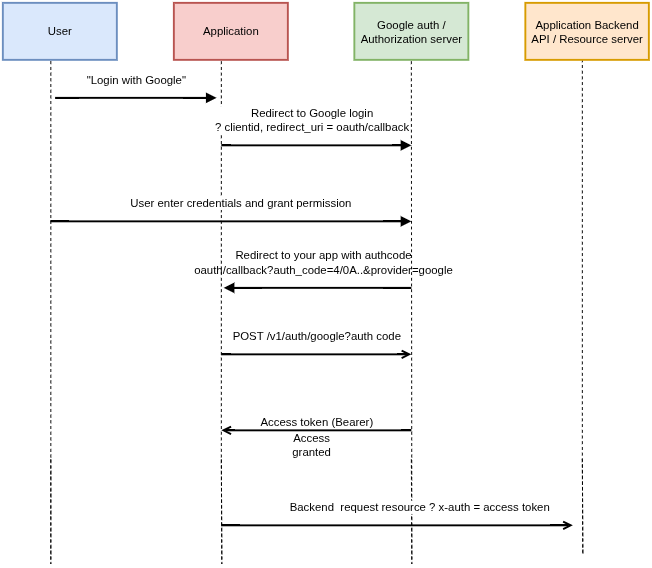
On Android, apps receive the OAuth callback by registering a custom URI scheme in AndroidManifest.xml:
1
2
3
4
5
6
7
8
9
10
<activity
    android:name=".LoginActivity" >
    <intent-filter>
        ...
        <category android:name="android.intent.category.BROWSABLE"/>
        <data android:scheme="customscheme"/>
        <data android:host="oauth"/>
        <data android:pathPrefix="/callback"/>
    </intent-filter>
  </activity>
After the user authenticates, Google redirects to:
1
customscheme://oauth/callback?code=AUTH_CODE&provider=google
Android intercepts this URL and routes it to the registered app. If an attacker’s app could intercept this callback, it would have the authorization code.
OAuth Code Interception via deep link hijacking
On Android, any application installed on the device can also register to handle the exact same URI scheme and intercept the intent data (Authorization code). As documented in Android’s security guidance on unsafe use of deep links, this creates a classic intent hijacking vulnerability. When an OAuth callback arrives, Android doesn’t automatically route it to the legitimate app instead, it asks the user which app should handle it. If a malicious app is installed claiming to handle the same scheme, the user gets a choice and might pick the wrong one.
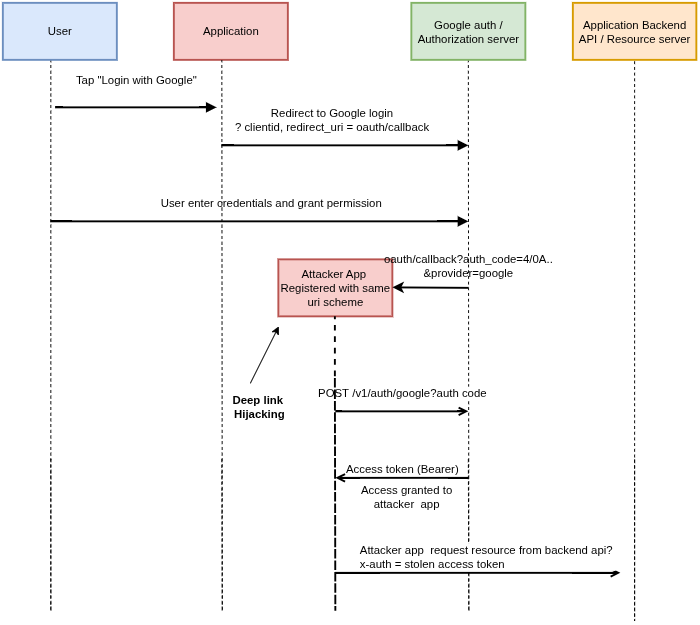
The intercepted authorization code can then be sent to the authorization server to exchange it for an access token.
Normally, exchanging an authorization code requires a client secret to prove the request is coming from the legitimate app. But since the mobile apps are public client, this client secret can be extracted by the attacker.
The Attack in Action
Install both apps (vulnerable app and attacker app) and initiated the login flow in the legitimate app:
- Google’s OAuth consent screen appears - user authenticates
- User grants permission for the app to access their profile
- Google generates an authorization code and redirects to
customscheme://oauth/callback?code=XXXXX&state=YYYY&provider=google - Android shows a disambiguation dialog listing both apps that can handle this URI
- User selects the malicious app, the callback goes to the attacker app instead
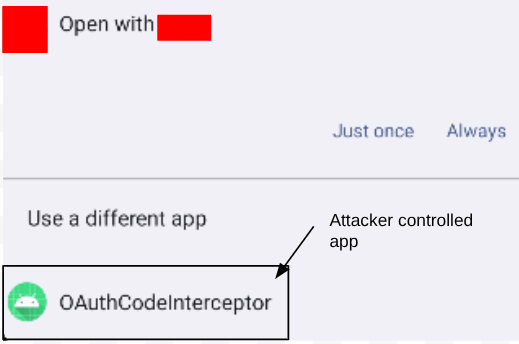
Selecting the malicious app from the dialog, the authorization code is successfully intercepted and logged in the malicious app’s logcat: 
Since the app does not implement PKCE, the attacker app with the intercepted authorization code can directly call this endpoint to obtain an access token. Now attempt to exchange the code for an access token: 
Now, the attacker app has a valid JWT access token for the victim’s account which can be used to access protected resources and perform actions on behalf of the real user.
Authorization code flow with PKCE (Proof Key for Code Exchange)
PKCE is a security extension to OAuth 2.0 designed to prevent authorization code interception attacks, especially important for public clients like mobile apps and SPAs that can’t securely store a client secret.
PKCE ensures only the original requester can do that exchange. PKCE (RFC 7636)
The PKCE flow:
- User taps login
- App generates cryptographically-random
code_verifierandcode_challenge1 2
code_verifier = cryptographically random string code_challenge = BASE64URL(SHA256(code_verifier))
- App sends code_challenge to the Authorization Server with the login request
- Authorization Server stores the challenge and issues an authorization code
- App sends the authorization code and code_verifier to exchange for a token
- Authorization Server hashes the verifier and checks it matches the stored challenge
- Issue access token if verified
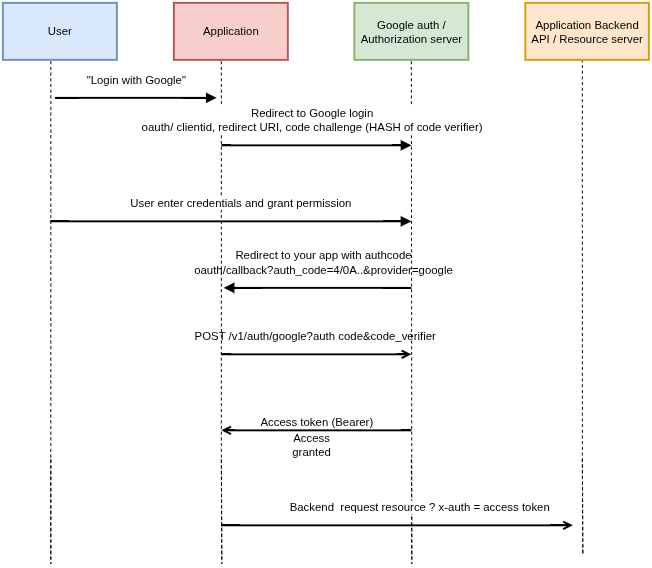
Now, even if the attacker intercepts the authorization code, it does not have a valid code_verifier that can match the code_challenge sent to the authorization server in the previous request. Without a code_verifier that matches the stored code_challenge, the authorization server rejects the exchange. PKCE cryptographically binds the authorization code to the app that requested it, making an intercepted code useless without the code_verifier.